User Access Review: The Audit That Happens Once a Year and Fixes Nothing
Newsletter #4 · Access Management
Every six or twelve months, organizations go through the same stressful ritual: sending emails, collecting Excel files, and trying to verify who has access to what. Once the compliance deadline passes, those files are archived — and the gap is forgotten until the next audit cycle hits.
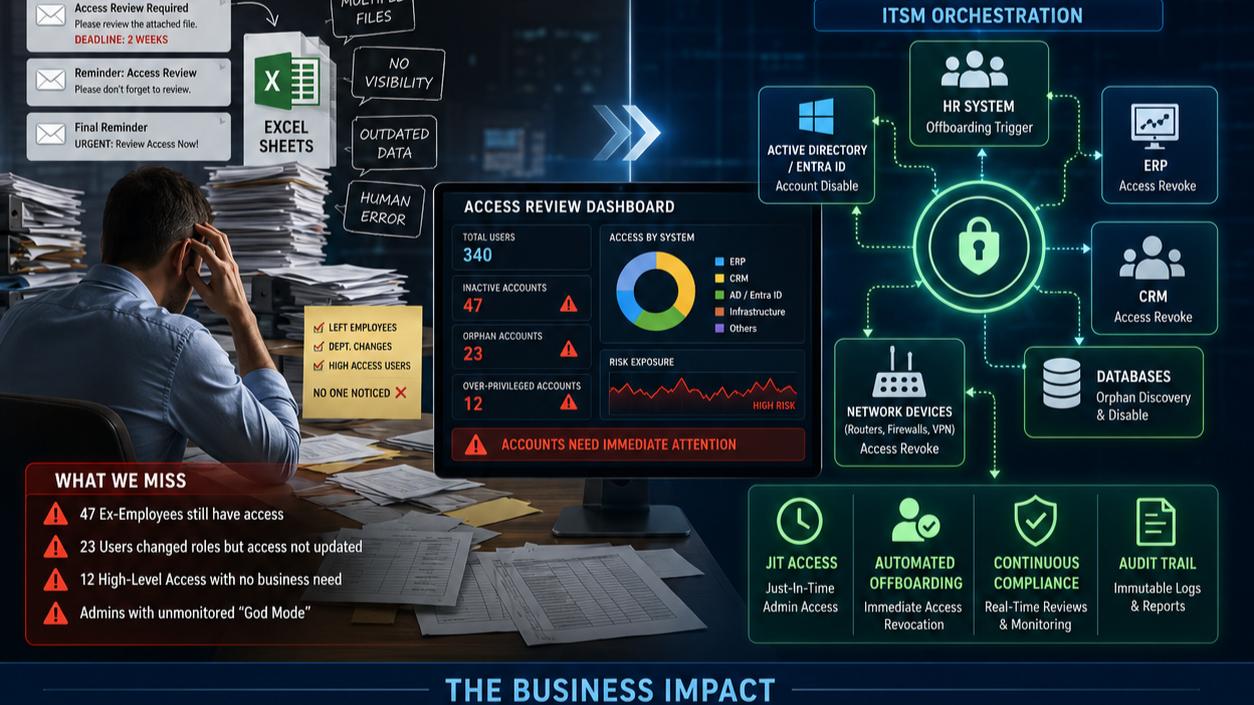
I recently reviewed a corporate cycle where the IT Manager sent out a standard request: "We need a user access review for IEBS, CRM, and ERP — deadline in two weeks." Out of 340 active users, 47 had already left the company, 23 had changed departments, and 12 had high-level access to sensitive systems with absolutely nothing to do with their jobs. Nobody knew. Nobody had noticed. The previous review had been fully "approved" by line managers who had simply checked the boxes without verifying a single line.
The Hidden Pain — Why Access Reviews Are Just "Compliance Theatre"
Email + Excel = A Process Out of Control
Shipping spreadsheets to dozens of line managers is a recipe for chaos. Some approve instantly without reading, some ignore the email entirely, others send back broken file formats. You end up with fragmented data silos and zero confidence in the reliability of the results.
The Rubber-Stamp Approval Loop
A typical manager looks at a long list, says "Yes, George needs access to the billing engine," and clicks approve. Except George resigned three months ago. Because managers lack time and clear context, they treat the review as a bureaucratic chore — leaving critical security backdoors wide open.
The Invisible "God Mode" — The Admin Blindspot
Admins often possess permanent, unmonitored access to databases, applications, and routers. They can log in directly at the system level and alter database records or device configurations without the application layer ever registering the change.
Review Cycles Lag Behind Corporate Reality
Conducting a review every 6 months means you are always late. In a single semester, dozens of employees offboard, new hires arrive, and cross-department transfers occur. Between these massive audit gaps, your corporate access landscape becomes uncharted, high-risk territory.
Auditing the Process, Ignoring the Substance
Auditors look for documentation showing that a review took place. They check the box and move on. The fact that dozens of inactive or over-privileged accounts still possess active credentials remains completely invisible — because the report only proves that the administrative ritual was completed.
The Hidden Metrics of Access Vulnerability
- 40–60 hours/year squandered by IT admins and managers manually chasing and formatting disparate Excel sheets to satisfy a temporary compliance deadline.
- 2.5%–7% Latent Risk Exposure: the average volume of stale, over-privileged, or "orphan" accounts lingering in enterprise networks post-termination.
- The Invisible Delta: the number of manual, unrecorded administrative changes performed directly inside core production databases outside formal IT Change Management boundaries.
The Strategic Shift — Do / Don't
- DON'T run critical security reviews via fragmented emails and Excel sheets → DO automate the workflow using your existing ITSM platform as a No-Code Orchestrator
- DON'T force managers to approve access rights blindly → DO provide managers with a clean interface showing when access was granted, why, and usage metrics
- DON'T restrict access reviews to rigid annual compliance deadlines → DO implement triggered, identity-centric reviews tied to HR offboarding and role-change events
- DON'T allow administrators to maintain permanent "God Mode" privileges → DO enforce Just-In-Time (JIT) Admin Access tied to an approved ITSM Change Request ticket
- DON'T assume a "completed review" equals a secure environment → DO distinctly separate compliance-driven checklists from actual automated security risk mitigation
The "No-Code" Blueprint — ITSM-Orchestrated Identity Architecture
1. The Orchestrated Offboarding Workflow
When an employee leaves, an HR event automatically triggers a No-Code workflow inside the ITSM. The ITSM engine immediately connects to Active Directory / Entra ID and disables the primary account — simultaneously pushing automated disable commands to all standalone applications (ERP, CRM) and infrastructure components (Routers, Firewalls, VPN gateways).
2. No-Code Cross-System Reconciliation & Orphan Account Discovery
The ITSM's built-in discovery bots regularly sweep local database user lists (ERP, CRM, Routers) and cross-reference them against the active users in Active Directory. If an orphan account is discovered, the ITSM automatically triggers a High-Priority Security Ticket to instantly isolate and disable the exposure.
3. Just-In-Time Access & DB Logs Integration
Administrators do not hold permanent admin privileges. When a DBA needs to perform a change, they open an ITSM Change Request. Upon approval, the ITSM automatically enables their administrative privileges for a restricted window (e.g., 2 hours) and automatically revokes them when the time expires. Every action is captured as an un-editable log inside the closed ticket.
4. Context-Aware Approvals & Continuous Compliance
Line managers receive dynamic web-based evaluation cards: "User X has administrative access to the ERP but has not logged in for 45 days. Do you approve retaining this access?" If the manager clicks Revoke — or fails to respond before the deadline — the ITSM automatically runs the de-provisioning workflow.
A user access review is not a compliance exercise. It is a fundamental security discipline that has been slowly suffocated by administrative bureaucracy.
How many inactive users or unmonitored administrative backdoors exist in your core business applications and routers right now? If you cannot answer that with automated certainty — you already know exactly where the vulnerability lies.